What an MCP server actually is
A plain explainer of MCP servers, told through two I have worked on — one that talks straight to an API, and one that is only a thin proxy.
People keep asking me what an MCP server actually is. Usually it is someone technical enough to have heard the term ten times this month, who has nodded along in every conversation, and has quietly decided it is now too late to ask.
So here is the plain version, told through two I have worked on. By the end you should be able to picture what one is, tell the two common shapes apart, and decide whether you want to install one or build one.
The model
MCP stands for Model Context Protocol. Drop the acronym and an MCP server is a translator that sits between an AI assistant and some other system, speaking a standard language on the AI’s side.
That standard language is the whole point. Before MCP, every tool that wanted to let an AI use it invented its own integration. MCP is the agreement that says: if your service exposes its abilities in this one format, any AI client that speaks the protocol — Claude Code, Codex, and others — can use it without bespoke glue.
A server exposes two useful things:
- tools — actions the AI can take (“search my bookmarks”, “create a contact”)
- resources — data the AI can read (“this bookmark”, “this user profile”)
The AI client asks the server “what can you do?”, the server replies with a list, and from then on the AI can call those tools while the server does the real work against the real system. The AI never needs to know how one service’s API is shaped, or how another one authenticates. That is the server’s job.
If you want it in one sentence: an MCP server turns “some service’s API” into “things an AI is allowed to do.”
Two shapes, two examples
The reason MCP confuses people is that the word “server” covers two quite different builds. Here are both, from things I have actually touched.
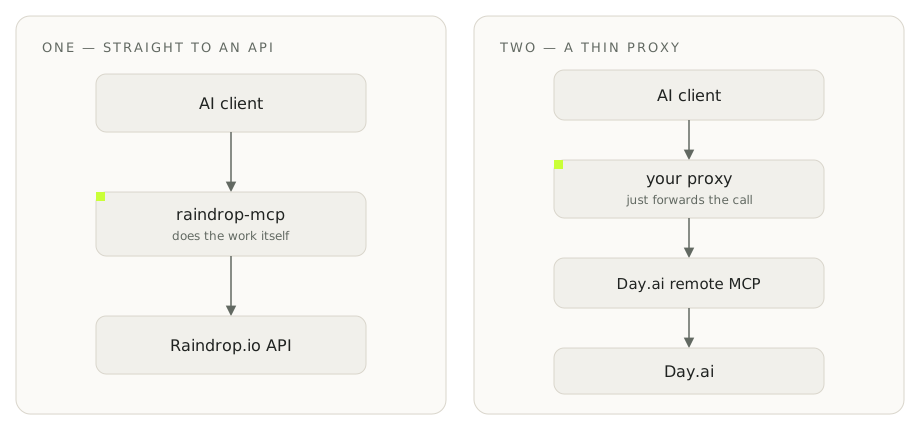
Shape one: the server that talks straight to an API.
raindrop-mcp is an open-source server for the Raindrop.io bookmarking service. It is not mine — I use it, and I contributed a bug fix, which I will come back to. It is written in TypeScript, validates everything with Zod, and exposes around ten tools: search bookmarks, manage collections, manage tags, and so on.
When the AI calls bookmark_search, the server takes that call, makes the real HTTP request to Raindrop’s API, and hands the results back in the protocol’s format. All the logic lives in the server. This is the “from scratch” shape: you write the translation between one specific API and the protocol, by hand.
Shape two: the server that is only a thin proxy.
A small Day.ai bridge I built is the opposite. Day.ai already runs its own MCP endpoint in the cloud. My local server is a few dozen lines whose entire job is to forward: the AI asks “what tools do you have?”, my server passes the question to Day.ai’s remote endpoint, gets the answer, and relays it back. It holds the credentials, refreshes the access token, and otherwise stays out of the way.
It does not know what tools Day.ai offers, and it does not need to. If Day.ai adds a tool tomorrow, my proxy exposes it automatically, because it never hard-coded the list.
Same protocol, two builds. One does all the work; the other does almost none and lets someone else’s server do it.
The gotcha I hit
Here is the part that will save you an afternoon. The protocol is fussy about the shape of your tool definitions, not just their content.
The bug I reported on raindrop-mcp was exactly this. All ten tools were failing validation because their input schemas were missing one required field: type: "object". The tools were logically fine. The descriptions were good. But the client rejected every one of them, because the schema did not match what the protocol demanded — down to that single key.
The lesson generalises. When an MCP server “doesn’t work”, it is very often not your logic and not your credentials. It is the protocol contract: a schema that is subtly the wrong shape, a missing field, a version mismatch between the SDK and the client. Check the contract before you blame your code.
What you can do now
You can now tell, when someone says “there’s an MCP for that”, which of the two things they mean: a purpose-built server that wraps a specific API, or a thin proxy standing in front of someone else’s.
If you want to use one, find a published server — raindrop-mcp installs with a single npx line and an API token — and point your AI client at it. If you want to build one, start with the proxy shape when the service already has a remote endpoint, and only write the from-scratch shape when it does not. And when it breaks, suspect the schema first.